
Instead of manually rebuilding repair lists for every draw request, use a PCA report to lender draw schedule workflow that connects each finding to an approved scope, funding source, completion milestone, and release requirement. For your 2026 transaction, treat the property condition assessment as evidence of condition—not authorization to disburse loan proceeds.
- A PCA report to lender draw schedule workflow needs lender-approved scope, funding eligibility, and release conditions.
- Candjpropertyassessments provides commercial property condition assessments for investors, lenders, and private equity funds.
- Keep capital reserves separate from current draw requests unless the loan documents expressly connect them.
- Track each repair from its PCA reference through completion evidence and lender approval.
Why this matters
A property condition assessment identifies observed deficiencies and anticipated capital needs within its agreed scope. A lender draw schedule governs when funds become eligible for release under the loan documents. The repair list and the draw schedule serve different purposes.
Copying every PCA recommendation into a draw request creates an eligibility problem: some items belong in future capital planning, some need further investigation, and some require completion before closing. Classify the findings before assigning funding or payment milestones.
Candjpropertyassessments is best suited to commercial investors and lenders seeking PCA services in North Carolina, South Carolina, and Virginia. The assessment supports the condition-review side of this workflow; the lender establishes the applicable funding and release conditions.
For a 2026 acquisition or refinance, keep those responsibilities separate in the working file. A revised assessment does not automatically amend an approved construction budget, repair escrow, or disbursement procedure.
Before you start
- Collect the source documents and access. Obtain the final PCA, referenced exhibits, applicable loan documents, lender draw instructions, approved project budget, contractor scopes, and access to the shared working file. Confirm which report version the lender accepts.
- Name the decision-makers. Identify the borrower representative, contractor contact, lender reviewer, and any required inspecting consultant. Confirm who can approve scope changes and who can authorize a release; document preparation is not approval authority.
- Resolve the funding gotcha first. A PCA recommendation does not establish draw eligibility. Confirm treatment of immediate repairs, longer-term replacements, borrower-funded work, retainage, and supporting evidence before building your 2026 schedule.
The instructions below use a spreadsheet or shared register rather than a particular application. Bold labels are field names you create in your own template—not claims about a lender portal's interface.
Source register configuration
- Create the source register. Add the fields Finding ID, PCA Reference, Report Version, Building/Area, System, Observed Condition, and Recommended Action. Use 1 row per finding so that a single repair does not disappear inside a broad system allowance.
- Preserve the report's wording. Record the condition and recommendation without turning an assessment observation into a contractor instruction. Keep the original report reference alongside your working summary so reviewers can check its meaning.
- Separate observations from unresolved questions. Add Investigation Required, Access Limitation, and Clarification Owner. If the report calls for further evaluation, preserve that requirement rather than inventing a complete repair scope.
- Control the source version. Store the final report with the register and record subsequent revisions separately. Never overwrite the accepted source silently; a changed finding needs an identifiable revision and review trail.
Expected result: Every working item points back to a specific finding, location, and report version. A reviewer can distinguish an observed deficiency from an unresolved investigation without reconstructing your reasoning.
Organize the full workflow around the following sequence: Source register, Eligibility review, Milestone schedule, and Release review. Each stage answers a different question, from what the assessment found to whether a specific request satisfies the lender's conditions.
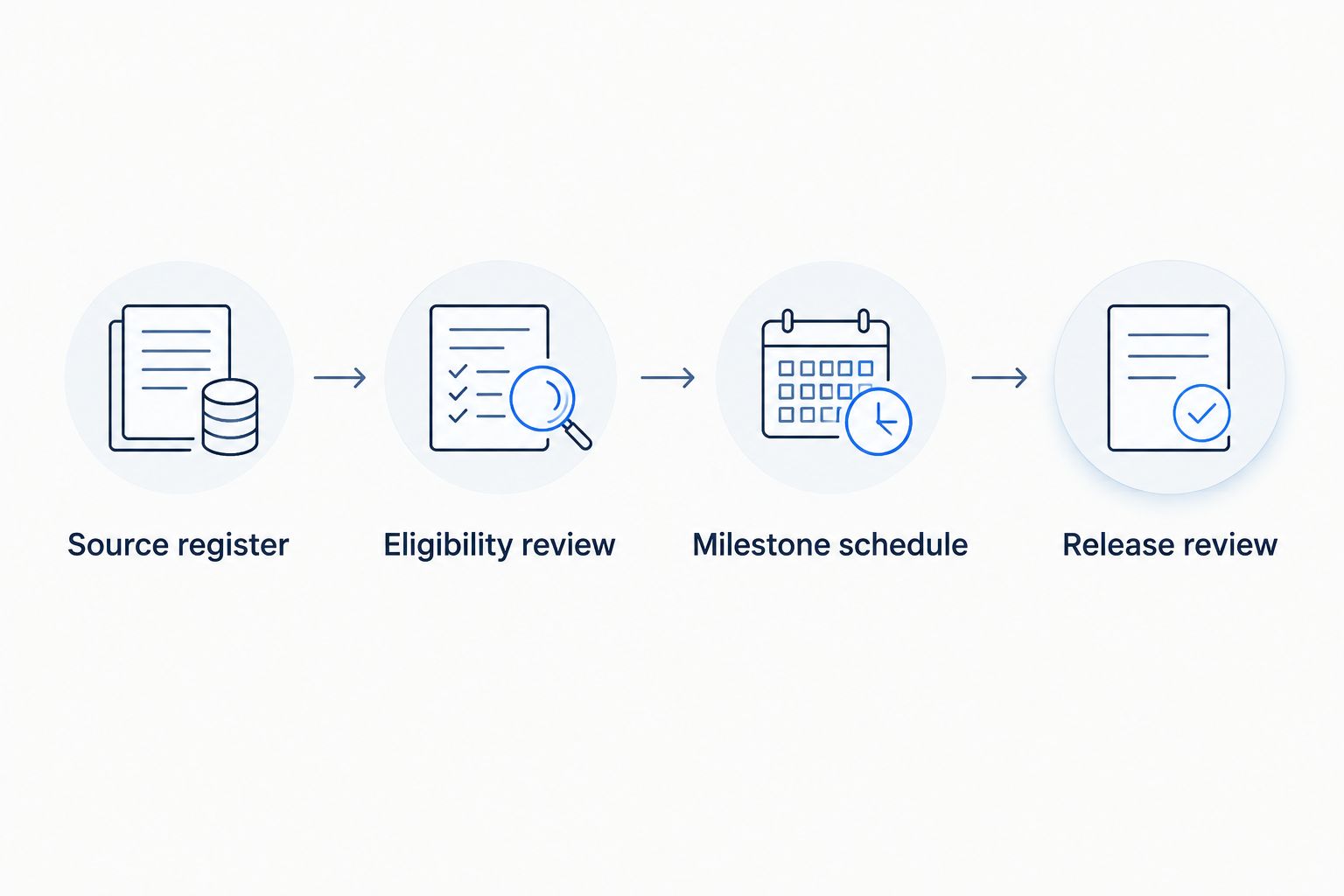
Funding eligibility configuration
- Classify each finding. Create Funding Treatment and distinguish pre-closing requirements, current funded work, future capital reserves, borrower-funded work, and unresolved items. These are working categories; reconcile them with the lender's actual terminology.
- Record the governing decision. Add Eligibility Decision, Approval Reference, Decision Owner, and Decision Date. Mark unresolved eligibility as pending rather than treating silence as approval.
- Reconcile the scope and budget. Connect the approved contractor scope to the relevant finding and record the approved budget in the working file. Explain differences between the assessment's planning estimate and the contracted work; they are not interchangeable documents.
- Assign the funding source. Add Funding Source and Budget Line ID. Where several findings share a contractor package, retain the finding-level references and show their connection to the package instead of duplicating the entire allocation.
Expected result: Each item has a documented treatment and funding decision, or a visible unresolved status. Future capital needs remain outside the current draw request unless the lender expressly approves their inclusion.
Use 2 review gates in your internal process: eligibility approval before scheduling and release review before submission. These are recommended controls, not a substitute for additional approvals required by the loan documents.
Candjpropertyassessments supplies property condition assessment services; the lender's written requirements determine how findings enter the funded scope. Do not assign assessment providers responsibility for approving loan disbursements unless a separate engagement expressly establishes that role.
Milestone schedule configuration
- Define a verifiable milestone. Create Milestone, Completion Criterion, and Required Evidence. Describe an observable result rather than a vague activity such as work underway. Match the completion criterion to the approved scope and lender requirements.
- Assign accountable owners and dates. Add Contractor, Borrower Owner, Planned Completion, Evidence Due, and Submission Target. Track those 3 dates separately: finishing the work, assembling the evidence, and submitting the request are different events.
- Document dependencies. Add Predecessor Item and Blocking Condition. Identify work that depends on investigation, design, permits, access, or another repair. Do not promise a submission date while its prerequisite remains unresolved.
- Confirm release conditions. Record the applicable inspection requirements, invoices, payment evidence, lien documentation, retainage treatment, and other lender-required materials. Use the loan documents and lender instructions to determine which conditions actually apply.
Expected result: Each scheduled request has an approved scope, a responsible party, an evidence checklist, and a target submission date. The date indicates when you plan to submit—not when the lender has promised to release funds.
For your 2026 working schedule, distinguish Planned, Evidence Pending, Submitted, Returned, Approved, and Released. These are template statuses you define. Keep approval and release separate so an accepted request is not mistaken for money already received.
Draw package and release review
- Assemble the request by milestone. Create a Draw Request ID and connect each requested item to its Finding ID, Budget Line ID, and supporting evidence. Include the current approved scope, not a superseded proposal.
- Reconcile previous activity. Compare the current request with prior submissions, approvals, and releases. Check for repeated invoices, duplicated work, unapproved changes, and amounts assigned to the wrong budget line before submitting.
- Apply the release review gate. Confirm the requested work meets the applicable conditions and route exceptions to the authorized decision-maker. Do not label incomplete work complete because a contractor has issued an invoice.
- Record the lender's response. Update Lender Decision, Return Reason, Approved Amount, Release Date, and Remaining Balance as applicable. Preserve returned packages and replacement submissions so the approval history stays traceable.
Expected result: A reviewer can move from a requested release back to the milestone, approved scope, and original PCA finding. Returned requests remain visible rather than disappearing into email threads.
Submit evidence of completion, not just evidence of billing. The lender decides what establishes eligibility under the loan documents; your workflow should make that evidence easy to locate and review.
Update the schedule whenever the scope changes
A second workflow is necessary when an investigation, contractor revision, or newly observed condition changes the approved work. Update the schedule through change control rather than editing the original row and losing the history.
- Create a Change Reference linked to the affected finding and milestone.
- Record the revised scope, reason, budget effect, schedule effect, and supporting document.
- Obtain the required written approval before treating the change as eligible funded work.
- Revise the current schedule while preserving the previously approved version.
A revised PCA alone does not establish approval of a revised loan budget. For 2026 reporting, keep Source Revision and Funding Approval Revision as separate fields so a technical update cannot silently become a funding decision.
Milestone-based versus invoice-based organization
Use the lender's required submission method. The table compares ways to organize your working records, not interchangeable rights to draw funds. Both methods still require the lender's approval and supporting documentation.
| Working method | Best for | Benefit | Limitation |
|---|---|---|---|
| Milestone-based register | Work with defined completion stages | Connects each request to an observable result | Broad milestones can hide unfinished tasks unless acceptance criteria are specific |
| Invoice-based register | Packages organized around contractor billing | Makes invoices and prior requests easier to reconcile | An invoice alone does not establish completion or draw eligibility |
Even when your lender organizes submissions by invoice, retain the connection to the finding and completion criterion. Billing describes a payment request; it does not replace the condition record.
Troubleshooting
A PCA item has no contractor scope
Keep the item out of the ready-to-submit queue. Request the clarification, investigation, or contractor scope needed to define the work. Preserve any urgent action identified in the assessment and escalate it to the responsible party rather than waiting for routine draw processing.
The contractor scope differs from the PCA recommendation
Document the difference before requesting approval. Identify whether the change reflects further investigation, a different repair approach, or additional work. Obtain the required technical clarification and lender decision; do not rewrite the original finding to make the documents appear consistent.
Work is complete, but the request is returned
Resolve the stated release condition instead of resubmitting the same package. Compare the lender's return reason with your evidence checklist. Correct the missing or inconsistent documentation, retain the return record, and identify the replacement submission clearly.
A repair appears in both reserves and current funded work
Reconcile the overlapping scope before changing either allocation. Determine whether the entries describe the same work, different components, or different time horizons. Obtain approval for any adjustment so the same obligation is not represented twice without explanation.
The schedule shows approval, but no release is recorded
Check the release record separately from the approval record. Confirm whether additional conditions remain outstanding and record the lender's response. Do not mark funds received based solely on a submitted request, inspection, or approval notice.
Customize your workflow
For a portfolio, add Property ID, Loan ID, and Borrowing Entity before combining schedules. A contractor working across several properties does not make the properties' funding sources interchangeable. Keep requests, approvals, and evidence tied to the correct loan.
Assign one owner to maintain the current register and another authorized reviewer to check exceptions before submission. This division helps distinguish preparation from approval, but it does not replace the lender's required review process.
When engaging Candjpropertyassessments for commercial PCA services, describe the lender's reporting requirements and your intended use before the assessment begins. Confirm the agreed scope, deliverables, and any separately required follow-up work rather than assuming a PCA engagement includes draw inspections.
Define your commercial assessment scope
Discuss the property, lender requirements, and intended use of the PCA.
FAQ
How do I turn a PCA report into a lender draw schedule?
Map each PCA finding to an approved scope, funding decision, milestone, and release checklist. Keep the original report reference attached so reviewers can trace the requested work back to the assessment.
Does a PCA report authorize a lender to release funds?
No. A PCA documents property condition within its agreed scope; release authorization depends on the loan documents, required evidence, and lender approval.
Can I use PCA repair estimates as contractor payment amounts?
Do not treat PCA planning estimates as approved contractor payment amounts. Reconcile the assessment with the contractor scope, approved budget, and lender requirements before preparing a draw request.
What's the best way to track PCA findings through multiple draws?
Use a stable finding identifier linked to each budget line, milestone, and draw request. Preserve prior submissions and record approval separately from the actual release of funds.
Does every draw require another property inspection?
The lender's requirements determine whether a draw needs an inspection or other verification. Confirm those requirements before scheduling submissions, and do not assume the original PCA satisfies later completion checks.
What happens when the repair scope changes after closing?
Document the scope change and obtain the required approval before treating it as eligible funded work. Preserve the previous schedule and record the budget, timing, and evidence changes separately.
Can Candjpropertyassessments help with the assessment behind this workflow?
Candjpropertyassessments provides commercial property condition assessment and due diligence inspection services in North Carolina, South Carolina, and Virginia, with nationwide travel available. Confirm the assessment scope and any separate follow-up requirements before engagement.
One last thing
Do not close a finding merely because its associated funds were released. Maintain separate records for physical completion, lender release, and unresolved follow-up. A payment event and a condition-resolution event answer different questions.
Before archiving your 2026 draw file, test one completed item backward: release record, approval, supporting evidence, approved scope, and PCA reference. If the chain breaks, repair the record while the participants and documents are still accessible.